PDF To Plain Text icon: a document being converted into a text document

PDF To Plain Text

Turn PDF documents into plain text files.

Drop in one PDF or many, pick where the text files go, and press Extract Text. Your files stay on your computer — nothing is uploaded anywhere.

Get the app

Free download. The buttons below always get the newest release.

One window, three steps

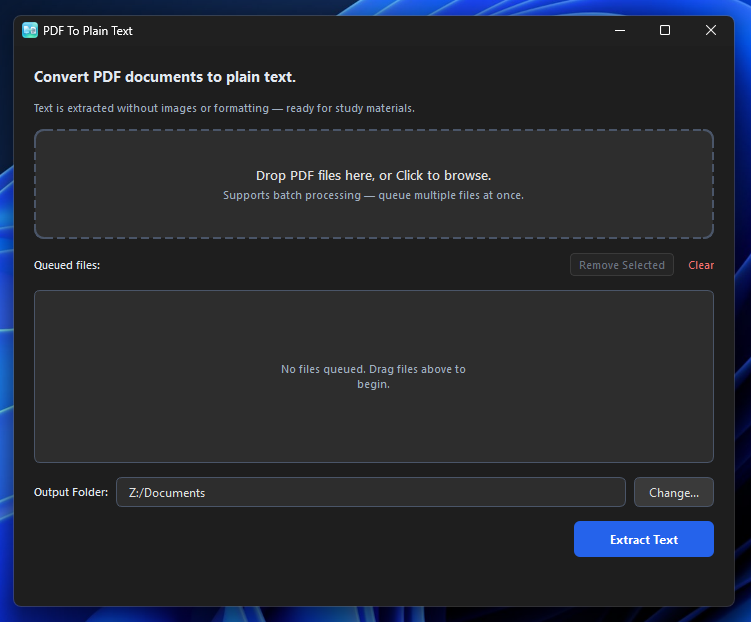
The PDF To Plain Text window: a drop zone at the top, the file queue in the middle, an output folder field, and an Extract Text button
The whole app: drop files, choose a folder, press Extract Text.
  1. Drop your PDFs in — or click the box to browse. Add as many as you like.
  2. Choose the output folder. The app remembers it next time.
  3. Press Extract Text. Each PDF becomes a .txt file with the same name.

What you get

Questions

Is it free?
Yes. It is free and MIT-licensed.
Do I need the internet to use it?
Only to download it. Converting files works fully offline.
Where do my text files go?
Into the folder you choose in the app. If a conversion fails, the app tells you which file failed and why.
What about scanned PDFs or photos of pages?
Those contain pictures of text, not text itself, so the result will be empty. The app works on PDFs that have real, selectable text.
I removed something from the queue by mistake.
Press Undo in the small banner that appears — you have a few seconds, and nothing on your disk is ever deleted.